Everything Moonside does
An audio baby monitor built around one principle: it never pretends. Here is the full list, including what is iPhone-only and what differs on Android.
Hear the room, not a screen
- Audio only. No camera in your child's room and no video feed to keep checking.
- Live sound from the nursery, also with the screen locked or the app in the background.
- A level meter shows at a glance how loud the room is.
- Mute the sound when you need quiet and still get the alerts.
- Hear Everything turns the noise filtering off, so the quiet sounds come through too.
Paired in about a minute
- Choose Baby on one phone and Parent on the other.
- Scan the QR code shown on the Baby phone, or type its 8-character code.
- No account, no sign-up, no password to remember.
- More than one Parent phone can be connected at the same time, so both of you can listen.
- Switch a phone between Baby and Parent whenever you like; pairings are kept.
- Remove a pairing in Settings and the other phone is told.
Alerts for what matters
- Connection lost: if the Parent phone hears nothing from the Baby phone for about 30 seconds, it sounds an alarm and shows a notification, then reconnects on its own when it can.
- Low battery: a warning when the Baby phone's battery runs low, so you can plug it in.
- Loud room: an alert when the room stays loud for a few seconds, with three sensitivity levels to suit your child.
- What the sound was (iPhone or iPad in the nursery): the sound is identified on the Baby device as crying, coughing, fussing or other noise, and a short clip is kept so you can play back what was heard. Clips stay on your own devices, are deleted automatically after 36 hours, and can be switched off.
- A history of the night: sounds, connection changes and battery warnings, stored only on your phone.
Settle your baby from where you are
- Talk to Baby: turn it on and hold a button to speak in the nursery. Nothing is transmitted unless you are holding the button.
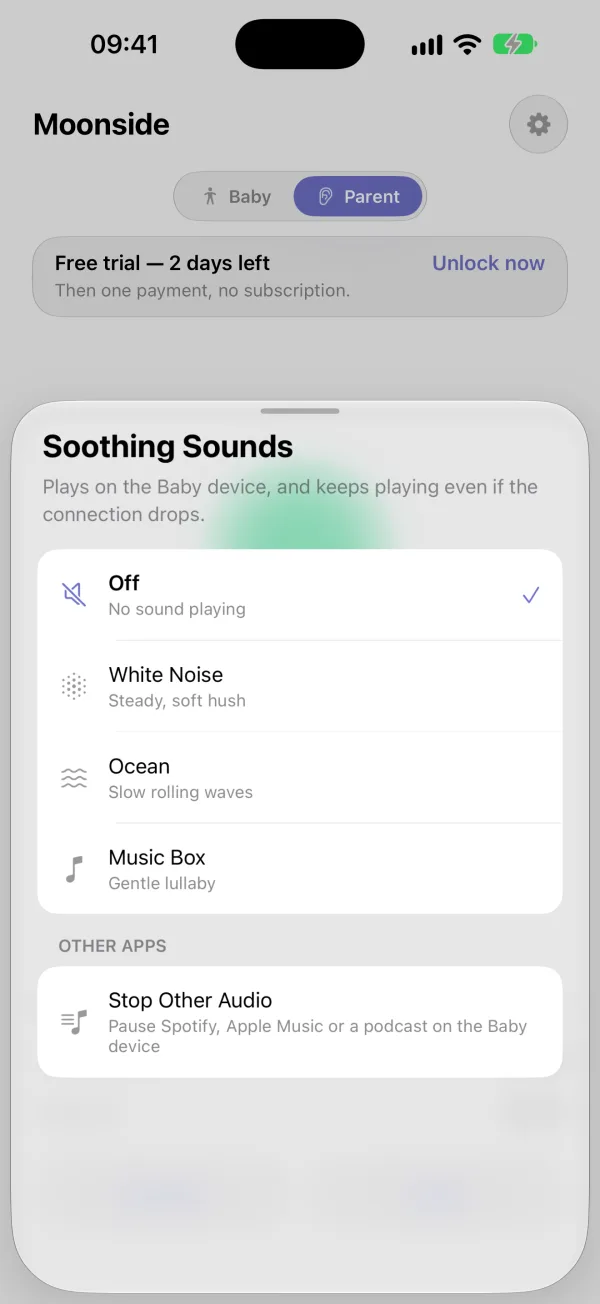
- Soothing sounds: play white noise, ocean waves or a music box on the Baby phone. They play on that phone, so a dropped connection does not interrupt them.
- Your own voice: record short messages and play them in the nursery, or have one play by itself when the room gets loud.
At a glance on your Lock Screen and wrist (iPhone)
- A Live Activity shows the listening status on the Lock Screen and in the Dynamic Island.
- A Home Screen widget shows when a sound was last heard and the Baby device's battery.
- The Apple Watch app shows the monitor's status and the latest sound alert. Live audio plays on the iPhone, not on the Watch.
Android and iPhone
Moonside is the same monitor on both, with one difference. Naming a sound as crying, coughing or fussing, and saving a short clip of it to play back, happen only when the phone in the nursery is an iPhone or iPad. With an Android phone in the nursery, the history records that a loud sound happened and when. On Android, an ongoing notification says when Moonside is listening, and the app asks to be left out of battery optimisation so it keeps running overnight. iPhone and Android together
Private by design
- Live audio is end-to-end encrypted between your paired devices and is not recorded by us.
- Devices trust each other only after you pair them in person.
- No account, no ads, no tracking.
- A small service helps your devices find each other and passes the encrypted audio along when they cannot connect directly. It cannot listen to it.
- The one-time purchase is checked with the App Store or Google Play and RevenueCat, a purchase service, using an anonymous ID. No name, no email, no audio.
Pay once, not every month
The Baby phone is always free. Using a phone as the Parent is free for 3 days after you first pair, so you can try it in your own home first. After that it is a one-time purchase: not a subscription and not per child. Restore purchase is in Settings. Pricing
Good to know
Moonside needs two devices, each with a network connection: iPhone or iPad on iOS or iPadOS 16.4 or later, or an Android phone. The app's own screens are in English. Moonside is not a medical device and does not replace adult supervision.
Try it on your own phones first
The first 3 days after pairing are free. The Baby phone is always free.